
Microsoft Windows assigns drive letters to disk volumes to help tell them apart. For example, the default letter assigned to your computer’s hard drive is probably ‘c.’ Each time you dock the iPod to a PC, Windows will assign the iPod the next available drive letter, such as ‘f’ or ‘g.’ But isn’t the letter ‘i’ the most appropriate drive letter assignment for the iPod?
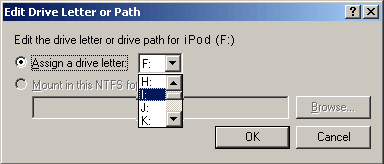
Here’s a simple tutorial on how to assign the drive letter ‘i’ to an iPod connected to a PC using Microsoft Windows XP or Windows 2000.
Tutorial: Assign Your iPod to Microsoft Windows Drive Letter ‘i’

Frank Wilson is a retired teacher with over 30 years of combined experience in the education, small business technology, and real estate business. He now blogs as a hobby and spends most days tinkering with old computers. Wilson is passionate about tech, enjoys fishing, and loves drinking beer.














Leave a Reply