11/15/2006
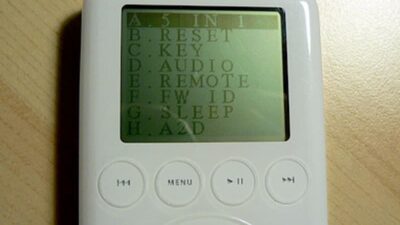
Turn on iPod Diagnostic Mode
Do you suspect that your iPod has a hardware problem? The iPod's built-in diagnostic mode is a quick and easy way to determine if you have a "bad" iPod.How to Turn on iPod Diagnostic Mode
The following procedure will activate the iPod Diagnostic Mode with the following iPods (Photo, Nano, Video, and Mini).
- Turn off the "hold switch"
- Press and hold "Menu" and "Select" buttons simultaneously for 10 seconds to reset the iPod.
- The Apple logo will appear and you should feel the hard drive spinning up. Press and hold both the "Back" and "Select" buttons at the same time.
- You will hear an audible chirp sound and the logo should appear backwards. Let go of the "Back" and "Select" buttons. You are now in Diagnostic Mode.
digg story | methodshop
I had forgotten about this. My 4G 20GB iPod recently stopped being recognized by Windows and iTunes. It would lock up both. I got the bad folder deal and all. Also got the screen referring me to the support site. There is a HUGE thread over there regarding iPods that not longer work (HDD failure they call it). I called customer support and without having to pay (my iPod was 2 months out of warranty) was told that I was basically SOL. I either could send it to them and pay $250+ bucks for them to fix or - and I quote - "Look at the new models and see what you like". I was pissed. Any way I resigned myself to getting a new iPod (4GB Nano) causing some serious problems with my wife. I put the old one in a drawer until that website that pays you for junked iPods came back online and could get $15-20 bucks for it.
Anyway I fish it out of the drawer use this diag mode and voila! It works again. iTunes recognized immediately and it's updating as we speak. WOW! I gotta go over to the Apple support forum and inform all those depressed folks. Yeeeha!!!!! Did I mention I'm totally jacked it's working again.
BTW: If you run the Hard Drive Diag. test make sure you have it hooked up to a power supply. It sucks through battery power like no ones business.
It may be old, but a lot of people seem to overlook the fact that when it comes to information consumed by masses, some people just don't have as much time as others. This could be the first time a lot of people are learning about this
Links to this post:


RSS Subscribe
Turkey Bowl is a 3D perspective target game where you celebrate the fall harvest by knocking over turkeys with bowling apples. Here's a hint, the turkeys further away are worth more points. Happy Thanksgiving!!!
Has a virus or hard
drive crash wiped out your entire music collection on your computer? No
problem. Here's how to copy music off your iPod or iPhone and back onto your computer.
Bugs tend to freak us out. Mosquitoes, spiders, wasps, centipedes... you name it. If it crawls, bites or buzzes anywhere near our faces, then we squirm, swat and run. But what's worse than a little bug crawling on or biting you? How about a really, really big one? Here are some of the biggest bugs on Earth. Enjoy!. 


Post a Comment