1/16/2007
MoGo Wireless Bluetooth Mouse
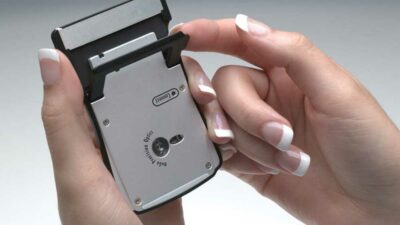
The MoGo Wireless Mouse is a business-card sized, Bluetooth-enabled mouse that stores and recharges neatly inside (yes, inside…) your laptop's PC card slot. To recharge your MoGo Mouse, just slide it into the empty PC card slot in your laptop. It will fully recharge in less than an hour and provide you with enough power for about 8 or 9 hours of use.
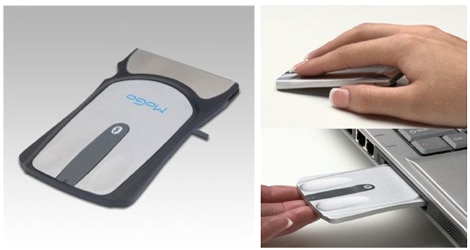
As you can imagine, the MoGo Mouse is specifically designed for people who spend a lot of time traveling like writers, reporters and sales reps. Other mice, even those meant for travelers, usually don’t cut it. Mini-mice (aka “walnut shells”) get lost in your hand and are difficult to maneuver, and the idea of carrying a full-sized mouse defeats the entire purpose of mobility on the go.
The MoGo Mouse is a natural fit for road warriors. Storing it inside you PC Card (PCMCIA) slot is pure genius and the fact that it charges there is just the icing on the cake. The only thing I'd like to see in future models is a scroll wheel. I know that the size of it makes it hard to have a wheel but maybe a touch wheel, like one some laptops, could have been possible.
digg story | methodshop

As you can imagine, the MoGo Mouse is specifically designed for people who spend a lot of time traveling like writers, reporters and sales reps. Other mice, even those meant for travelers, usually don’t cut it. Mini-mice (aka “walnut shells”) get lost in your hand and are difficult to maneuver, and the idea of carrying a full-sized mouse defeats the entire purpose of mobility on the go.
The MoGo Mouse is a natural fit for road warriors. Storing it inside you PC Card (PCMCIA) slot is pure genius and the fact that it charges there is just the icing on the cake. The only thing I'd like to see in future models is a scroll wheel. I know that the size of it makes it hard to have a wheel but maybe a touch wheel, like one some laptops, could have been possible.
"an excellent tool for the road warrior or... minimalist." ~ GetUSB.infoIf you spend a lot of time on the road with your laptop, then the MoGo Wireless Mouse will just make your life easier.

digg story | methodshop
Post a Comment
Using this small mouse on a plane seems like a good idea, but "For now, as a technology that is not yet approved for in-flight use, Bluetooth devices will be subject to the same rules as cellular phones, meaning that they must be turned off during flight." Has this rule changed?
This mouse was getting great reviews, so I decided to gave it a try. It's fantastic! I don't have Bluetooth imbedded in my HP laptop so I had to buy an external adapter. But it was well worth it and worked flawlessly (Kensington, make sure it's Bluetooth 2.0). Installation was easy, and tracking performance is great on all surfaces I've used it on. I travel for work and often have to work remotely, and the mouse is always conveniently within my reach. The battery life is good too.
Post a Comment
Links to this post:

Is a weak arm or physical stamina keeping you from taking your Nintendo Wii gaming experience to the next level? Perhaps you should look into getting the Nintendo Wii Nunchuck Controller. This accessory adds even more innovation to the next generation of gaming and does it all with less physical movement.
Put
on an anti-viral panty liner and let the battle between the
spoiled rich blonde bitches begin! It's Paris Hilton, heiress
to the Hilton Hotel empire vs Lacey Underall from the movie
Caddyshack.
Our interview with Ryan was just like his lyrics, honest and articulate. Ryan was very forthcoming and spoke openly about everything from his break with No Knife to his freaky cats.
When it comes to so-called heavy metal supergroups, a lot of them usually don’t last long. But for New Orleans’ Down – made up of Ex-Pantera vocalist Phil Anselmo and bassist Rex Brown, Corrosion of Conformity guitarist Pepper Keenan, Crowbar guitarist Kirk Windstein, and Eyehategod drummer Jimmy Bower – there has been something special that has kept them unified for over 15 years.

Are
you trying to eject your iPod from your computer but the "Do
Not Disconnect" won't go away? Don't worry, this is a common
problem with a fairly easy solution.