

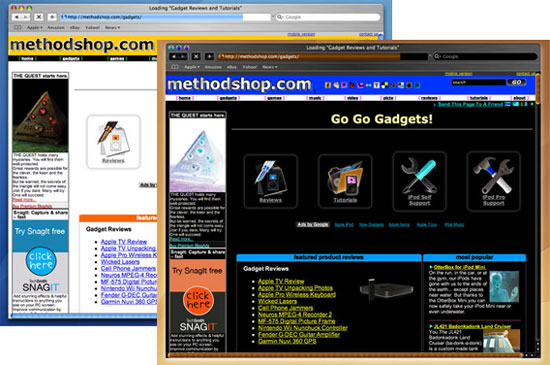
Is the monitor on your Macintosh computer inverted? Are you seeing black where it should be white? Does everything look negative? If you answered yes to any of these questions, then you accidentally enabled a Macintosh feature for people with impaired vision.
We’ve heard of people doing all sorts of crazy things to fix this problem like swapping video cards, buying new LCD monitors, attempting a monitor calibration or even replacing RAM. But there’s a much simpler way to fix this inverted screen problem. Chances are, all you need to do is change a few settings in your Mac OS X System Preferences panel. There are some extreme cases where a little more fiddling is required, but we have solutions for those as well.
So don’t worry. Your video card isn’t broken. Now let’s fix your inverted monitor problem.
Tutorial: How to Fix an Inverted Macintosh Monitor

Frank Wilson is a retired teacher with over 30 years of combined experience in the education, small business technology, and real estate business. He now blogs as a hobby and spends most days tinkering with old computers. Wilson is passionate about tech, enjoys fishing, and loves drinking beer.













 10 Creative Alcohol Ads That Are Also Extremely Funny
Leave a Reply