
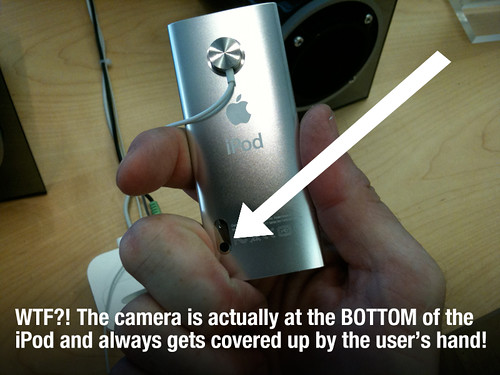
 The new iPod Nano unveiled by Steve Jobs last week has a serious design flaw: Stupid Camera Placement!
The camera is actually on the back BEHIND the click wheel — exactly where your hand is! There is virtually NO way to hold the new little iPod Nano and NOT have your damn finger in the way of the lens. No joke. What was Apple the thinking?
I went into the Apple Store yesterday and wanted to buy a new Nano. The video camera was so poorly placed that I refused to buy it. I looked at five different Nanos and all of them had test shots by customers. Virtually all photos had fingers in the picture.
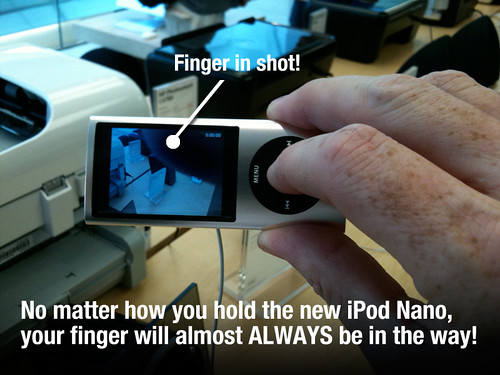
Insane! Apple is usually excellent at this sort of common sense… Who puts a f-ing camera right where your hand holds the device?
99.9% of all shots have the user’s finger in the way!


Frank Wilson is a retired teacher with over 30 years of combined experience in the education, small business technology, and real estate business. He now blogs as a hobby and spends most days tinkering with old computers. Wilson is passionate about tech, enjoys fishing, and loves drinking beer.














i own an ipod with a camera and i make all my videos with it with no fingers in the shots
This is only one of the stupid things about the nano. How do you think you access the video? Via iTunes, where all the rest of the data is accessed, of course? Wrong! You first have to activate "Use as removable storage" and then copy the files, like you would off any ha or data card… 🙁
c´mon Apple, you REALLY can do better than this.Hope I´ll see an upgrade of iTunes reeeeeal soon.
To the guy who wrote "God gave you a brain, use it". This is the same stupid opinion that all the guys who think it´s ok to have to read brick manuals in order to use software have. We´re not supposed to have to figure things out – the device is supposed to figure out how WE would do things, not the other way round.
Anyway pretty much pleased OWNER of a new nano
Use you thumb and forefinger to hold it on the right side. Using your thumb to take a photo. This will keep your fingers easily below the camera. It seems that Apple wants you to use two hands since you’d need your left hand to steady it. A steady shot will always produce a better picture. The way your holding in the second picture is weird = : P
Turn the iPod upside down. The camera Does the Right Thing(tm) and so does the screen.
It was pretty obvious in the store when I tried it out…
Maybe you are not bright enough to get the finger out of the way when you are shooting the video. lol
God gave you a brain, use it.
"This pimply-faced, unshowered hipster by the way, was wearing a wool ski cap inside on a sunny, 80 degree New York day
Read more: https://methodshop.com/stupid-ipod-camera-placement#ixzz0RCGbdwO3";
Was it this guy?
http://simpsons.wikia.com/wiki/Jimbo_Jones
Hold the left side with the fingers of your left hand (yes, you can do that without hiding the screen). Hold the corners on the opposite end with the thumb and middle finger of your right hand. Press the button with your right-hand index finger. Not so different from using almost any point-and-shoot digital camera. it's easy if you try.
You could hold it with your left hand… by the screen… away from the camera and then take the picture with your right hand. But man then you'd have to use both hands right?!?! I think it'll be ok.
There have been a lot of reviews on the Web that show footage shot with the new Nano. None of these clips have a finger blocking the shot. They must have figured out the correct way to hold the Nano when shooting video 😉
Seriously. Have you tried it? It’s a blunder.