
Has someone asked you yet “What is Twitter”? As Twitter continues to gain in both popularity and users, those of us already on Twitter might find ourselves in a position where we have to explain Twitter to a non-techie type person like our Grandma.
What Is Twitter?
So what do you say when someone asks you something silly like “What is Twitter?” or “Are you on the Twitter?” Here’s a “how to” article full of images and videos that help explain some functionally and uses of Twitter.
According to Wikipedia, Twitter is a “free social networking and micro-blogging service that allows its users to send updates (otherwise known as “tweets”) which are text-based posts of up to 140 characters in length.”
Yeah, I can’t really see someone like your Grandparents or John McCain understanding that sentence (sadly McCain can’t use email yet). So what should you say? How do you explain Twitter?
Try saying something like this:
Twitter is a free online service that allows you to send messages to hundreds (or even millions) of your friends all at the same time. Your Twitter friends receive an alert each time you send a new message either on their mobile phones and/or on their computers.
Common Craft’s Explanations in Plain English video series is another great way to explain complicated tech stuff to people. This “plain English” video explains Twitter using friendly paper stick figures and colored pencils:
NERD NOTE: In addition to co-founding Twitter, Biz Stone is a designer and writer with a keen interest in personal publishing. Upon discovering the blog format in 1999, Biz embraced it and went to work cultivating the medium first as a creative consultant to various blog providers and associated projects–such as Xanga, Blogger, WebCrimson, and BlogBuddy. You can follow Biz on Twitter here: @biz
3 Reasons To Use Twitter
The inevitable follow up question to “What is Twitter?” is “Why would I want to use Twitter?” So now you need to explain the value of Twitter.
Variety of Content:
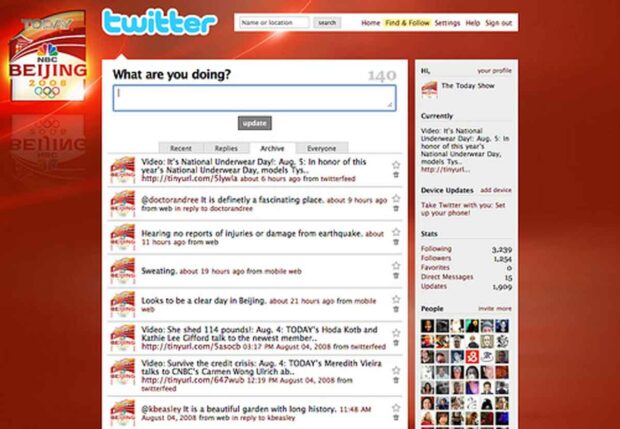
Part of the reason why Twitter is growing so fast is because of the variety of content available. Everyone from major icons like Barack Obama and NBC’s Today Show to the average teenager, are already on Twitter. Everyone has a unique viewpoint and Twitter makes it very easy to express ourselves.
News Source & Instant Information:
Twitter users are all tweeting information as it happens and before it can be elegantly written up into a blog post or news article. It’s like tapping into a collective word-of-mouth source with the ability to spread instantly.
Want to know things before other people do? For example, who Barack Obama picked for his 2008 running mate, which conference speaker or after hours party you should check out, or what new Apple product Steve Jobs is announcing during his next keynote? All of this information will be on Twitter first. If you work in the media, the tech industry or like being the first to know things, then Twitter is a very valuable information tool. Some savvy journalists are even using Twitter to score breaking news leads.
Promotional Tool:
Twitter can also be an excellent promotional resource. At one point in our lives, we will assume the role of “promoter” for something or another. If you are in a band, have your own blog, are throwing a big party, raising money for a charity or just want to show off your vacation photos to your friends, then Twitter can help you quickly get the word out.
Here are a few examples of “promotional” tweets that can help drive web traffic.
Popular Twitter Users
If someone asks you who they should “follow” on Twitter besides their friends (and @methodshop), tell them about a website called Twitterholic. Twitterholic.com provides a list of the 100 most popular Tweeters based on the number of their followers.
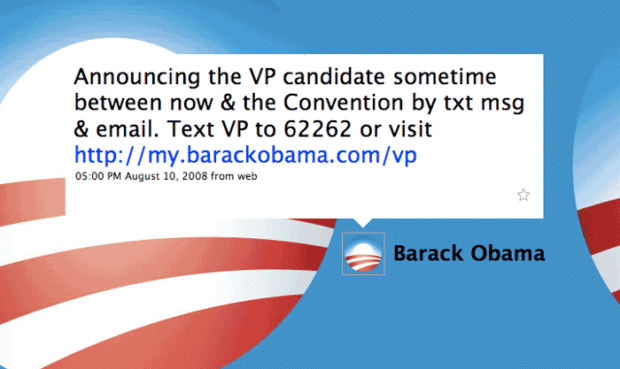
The top 10 people on Twitter changes frequently. Current top Tweeters include Ashton Kutcher (@aplusk), Ellen DeGeneres (@TheEllenShow) and Oprah Winfrey (@Oprah). But just for fun, here are a couple historic screen grabs from August 2008. Barack Obama is #1 with 57k followers and Kevin Rose from Digg.com is #2. At the time the screen grabs were taken, the 2008 American presidential elections were only months away and Twitter hadn’t gone mainstream yet. Barack Obama used his Twitter account to help build hype around the announcement of his VP running mate, Joe Biden. As a result, Obama quickly skyrocketed in followers, and he stole the top slot on Twitter from Mr. Rose.
NERD NOTE: Twitter began as a research and development project inside San Francisco start-up company Obvious in March 2006. It was initially used internally by the company’s employees, and officially launched in October 2006. The service rapidly gained popularity. In March 2007, it won the 2007 South by Southwest Web Award in the blog category.
To Be, Or Not To Be… Connected On Twitter
Remember, Twitter is for staying in touch, having conversations and keeping up with friends no matter where you or they are. It all depends how connected you and they want to be. Have fun and good luck!
You can “follow” MethodShop on Twitter at @methodshop.

Frank Wilson is a retired teacher with over 30 years of combined experience in the education, small business technology, and real estate business. He now blogs as a hobby and spends most days tinkering with old computers. Wilson is passionate about tech, enjoys fishing, and loves drinking beer.










Leave a Reply