

Looking for some ways to Download YouTube music videos to computer? Good, because you’re in the right place. Here’s how to Download YouTube music videos for free.
Ready to load up your iTunes Library with music videos? Sure you could go on Amazon and spend a fortune buying DVDs containing the music videos for all your favorite bands. But why spend the money if you don’t have to? Every music video you could ever want is already on YouTube. Plus there’re tons of rare and live videos to choose from that you’ll never find on DVD. And with a little know how, you can download and import all these YouTube music videos into iTunes… for FREE!
Download YouTube Music Videos Tutorial
Here’s a step-by-step tutorial on how to copy music video files off YouTube and convert them to an MP4 file compatible with iPad, iPod Touch, Apple TV, iPhone, and iTunes. In this tutorial we will be ripping videos from YouTube featuring one of the greatest rock bands off all time, Motley Crue. That’s right, this tutorial is Motley Crue themed and full of mentions of their songs. But feel free to rip whatever videos you want. Skrillex has some great stuff on YouTube, but everyone knows you are a closet Justin Bieber fan anyway.
Requirements:
- An iPhone, iPad, Apple TV or iPod Touch
- iTunes 6.0.1 or later
- The Firefox web browser
- An Internet connection
Download And Install Firefox
Firefox is a great open source web browser that allows 3rd party developers to create extensions that do things like… download and convert YouTube videos. Firefox works on Mac, PC and Linux.
Google Chrome also allows you to install browser extensions, but Google won’t let these 3rd party extensions download music videos from YouTube, because Google owns YouTube. However, you can still use Chrome to download videos from other sites like Vimeo.
So if you are using another web browser, like Safari, Chrome, or Internet Explorer, then unfortunately you are Dancing On Glass and need to take a moment to download and install Firefox. Do that first and then come back to this page using Firefox. But Don’t Go Away Mad, Just Go Away… and come back to finish the rest of this tutorial. Because Without You, this tutorial just wouldn’t be the same.
Install A Firefox Video Download Extension
Sorry, one more boring step before you become YouTube’s video downloading Public Enemy #1. Once you have Firefox installed, you’ll need to install an extension that will download and convert YouTube video clips. We recommend the following extensions: Video DownloadHelper or Easy YouTube Video Downloader. Our favorite extension is Easy YouTube Video Downloader, but feel free to decide on your own.
After you click on these links, then you’ll be prompted to install the browser extension and restart Firefox. After Firefox restarts, it will reopen this tutorial on MethodShop.
Search For High Quality Music Videos on YouTube
Whew! Now that the boring setup stuff is out of the way, we can start searching for music videos! Tens of thousands of music videos are uploaded to YouTube every day.
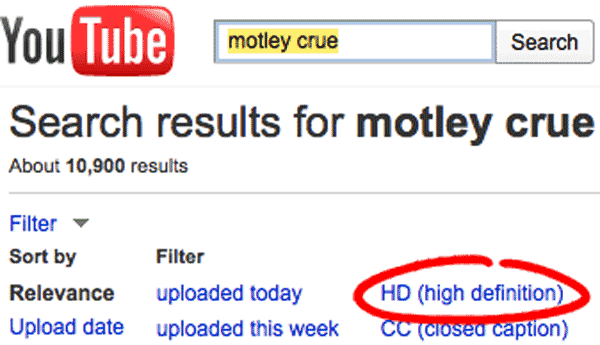
But the last thing you want to do is go through all this trouble and download a crappy low resolution video. Click on the “filter” link under the YouTube search box and select “HD (high definition)” to filter your search to just high quality video clips. 720p and 1080p are HD quality. Don’t waste your time with 240p.
Just find one good clip for now. You can go back and download all you want after you get through this tutorial. We’ve included some great Motley Crue videos below, but feel free to find and download whatever videos you want.
Some other clips we suggest ripping include: The Nasty Ass Honey Badger, The Worst Star Trek Fight Scene Ever, The Coke Happiness Machine and Dramatic Reading of A Break-up Letter.
Download & Convert!!!!
Finally!!! Let’s get On With The Show and download some music videos. Depending on what plugin you are using, the instructions will be slightly different. See below.
Easy YouTube Video Downloader
- Underneath the YouTube video you are watching on YouTube.com, there will be a “Download” button (shown below).
- Click on the button and select a format you want to download. Remember 720p and 1080p are HD quality.
- If you just want to download an audio file to play in iTunes, then select AAC or MP3.
Video DownloadHelper
- To the left of your video on YouTube will be a small icon of a blue, red and yellow ball (see image below).
- Click on the icon and select “Download & Convert.”
- Select MPEG-4 as the file type you want to download.
- Save the file to your computer.
Import Videos Into iTunes
Depending on your computer’s settings, you may be prompted to open the file you are downloading. Pick iTunes from the drop down menu. If you aren’t prompted during the download process, you can easily import your videos into iTunes later. Just launch iTunes, select Open from the File menu (File > Open) and do the Bad Boy Boogie in your chair.
And if you just want to just export out a MP3 of your video clip, then there’s another MethodShop tutorial that you might like: How To Convert Between Audio File Formats for Free Using iTunes
Make Sure iTunes Is Set To Import Files
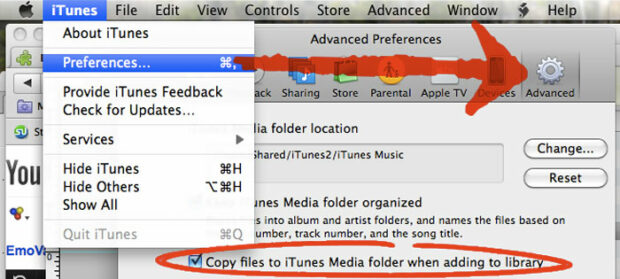
If you’re the Rock ‘N Roll Junkie and plan on downloading tons of videos from YouTube, then take a quick look at your iTunes import settings. After you download the music videos, you will probably want them to automatically import into iTunes.
Open iTunes. Go to the Preferences window and click on the “Advanced” icon. Make sure “Copy files to iTunes Media folder when adding to library” is checked.
That’s It! This Tutorial On How To Download YouTube Music Videos Is Complete!
Congrats! You did it! Now you know how to download YouTube music videos and import them into iTunes. Load up your iTunes Library and have fun.

Frank Wilson is a retired teacher with over 30 years of combined experience in the education, small business technology, and real estate business. He now blogs as a hobby and spends most days tinkering with old computers. Wilson is passionate about tech, enjoys fishing, and loves drinking beer.














 Netflix Backtracks On Their Qwikster DVD Spinoff Plan (2011)

Leave a Reply